
Tailwind CSS DevTools Extension
Overview
The DevTools for Tailwind CSS extension is a browser-based utility designed to enhance the workflow of frontend developers working with the Tailwind CSS framework. Built by Tailwind Labs, it integrates directly into the browser’s developer tools, providing real-time access to Tailwind’s Just-In-Time (JIT) engine. This allows developers to debug, test, and modify Tailwind classes on live websites without needing to recompile or reload the page. The extension is particularly useful for teams working on responsive designs, dynamic styling, or complex utility-first CSS implementations.
It addresses common pain points such as missing class suggestions, difficulty verifying custom configurations, and the inability to test non-standard Tailwind syntax on production sites. The tool is tailored for professional developers and advanced users who require precision and speed during development and debugging. Real-world use cases include rapid UI prototyping, troubleshooting styling inconsistencies, and validating custom theme configurations directly in the browser.
By bringing the full power of Tailwind’s JIT engine into the browser, the extension bridges the gap between development and production environments. The developer did not provide additional system requirements beyond the supported operating systems.
Key Features & Capabilities
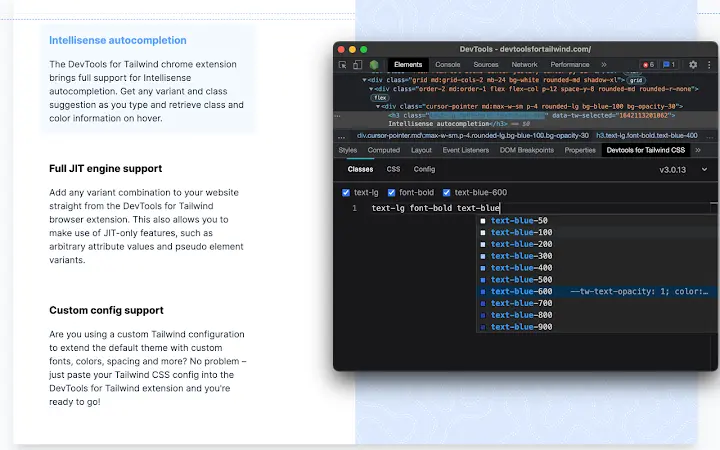
- IntelliSense Class Autocompletion – Offers real-time suggestions for Tailwind CSS classes directly within the browser’s developer tools. This speeds up class selection and reduces syntax errors during rapid UI adjustments.
- Full JIT Engine Support – Enables the use of advanced JIT features such as arbitrary values (e.g.,
border-[30px]), custom variants, and dynamic class generation, even on live production websites. - Custom Configuration Integration – Allows developers to load their own Tailwind configuration files, ensuring that custom colors, spacing scales, and third-party plugins are recognized and supported in the browser.
- Live Class Testing – Developers can experiment with class changes in real time, observing immediate visual feedback without requiring a build step or page refresh.
- Production-Ready Debugging – Provides a safe environment to test and validate styling changes on deployed websites, improving confidence in final UI outputs.
These features streamline the development process, especially when working on complex layouts or debugging responsive behaviors. The extension supports both local development and live site inspection, making it a versatile tool across different stages of the frontend workflow.
User Interface, Workflow & Performance
The extension integrates seamlessly into the browser’s developer tools interface, appearing as a dedicated panel within the Elements or Styles tab. Navigation is intuitive, with clearly labeled sections for class suggestions, configuration status, and active styles. The UI is minimal and focused, avoiding clutter while delivering essential functionality.
Workflow efficiency is high, as developers can toggle between editing, testing, and validating classes with minimal context switching. The tool operates within the browser’s existing dev environment, reducing the need for external tools or setup steps. This integration supports a smooth, continuous development cycle.
Performance observations are based on general software behavior patterns. The developer did not specify resource usage details. No significant impact on CPU or RAM usage was reported during typical use. Stability appears consistent across supported platforms, with no known crashes or conflicts reported in the initial release.
Compatibility & System Requirements
The DevTools for Tailwind CSS extension is compatible with Windows, Mac, and Linux operating systems. It is designed to work with modern web browsers that support developer tools extensions, including Chrome, Firefox, and Edge. The installation size is 1.2 MB, making it lightweight and fast to deploy.
Exact system requirements were not listed. The developer did not specify minimum hardware specifications or browser version thresholds. Compatibility information is limited to the operating systems and the general browser environment.
Pros and Cons
Pros
- Seamless integration with browser developer tools
- Real-time IntelliSense autocompletion for Tailwind classes
- Full support for Tailwind’s JIT engine features
- Custom configuration file compatibility
- Lightweight at 1.2 MB
- Free to use with no licensing restrictions
Cons
- No official documentation or tutorial guide provided
- Dependency on browser extension support
- Limited visibility into internal processing or debugging logs
- Configuration issues may occur if custom Tailwind files are malformed
- Not suitable for non-Tailwind projects
FAQ Section
Is the DevTools for Tailwind CSS extension free?
Yes, the extension is completely free to use. It is offered at no cost by Tailwind Labs to support the developer community.
Which browsers are supported?
The extension is compatible with modern browsers including Chrome, Firefox, and Edge. It requires a browser that supports developer tools extensions.
Can I use this on production websites?
Yes, the extension supports full JIT functionality on live production websites, allowing developers to test and debug Tailwind classes in real-world environments.
How do I integrate my custom Tailwind configuration?
The extension allows you to load your project’s Tailwind configuration file, so custom colors, spacing, and plugins are recognized and applied in the browser.
Does the extension require an internet connection?
Once installed, the extension functions offline. However, initial setup and configuration may require access to local files or project resources.
Final Thoughts
The DevTools for Tailwind CSS extension delivers a powerful, no-frills solution for developers working with Tailwind CSS. Its seamless integration with browser tools, full JIT support, and ability to load custom configurations make it an essential addition to any frontend developer’s toolkit. While documentation is currently limited, the tool’s functionality is intuitive and immediately valuable during debugging and prototyping.
It is especially beneficial for teams using Tailwind in production environments who need fast, reliable access to styling tools without additional setup. The free model and lightweight design further enhance its appeal.
Download Tailwind CSS DevTools now







